Snowflake Architecture Explained for Data engineer interviews


You’re in a client call. The architect asks: “Explain Snowflake architecture in 2 minutes – and why should we choose it over Redshift?”
Here’s the exact answer that has worked 10/10 times in interviews + client discussions.
The 3-Layer Architecture (the only diagram you need)
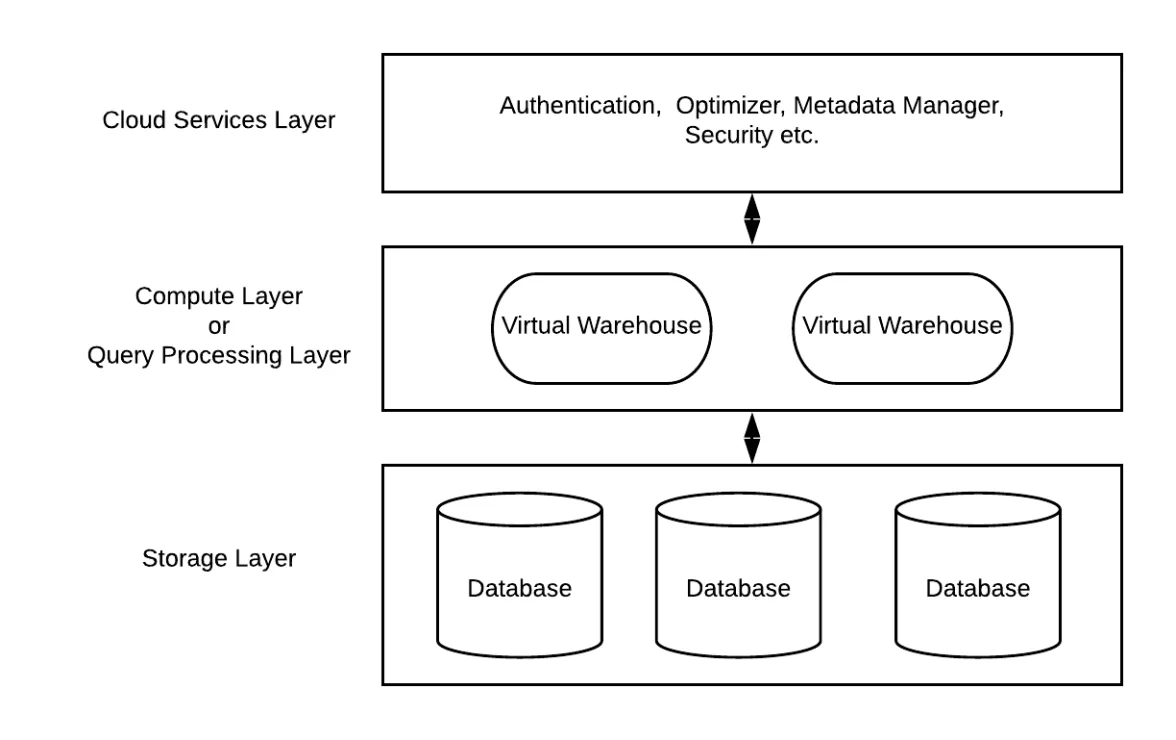
Key points to say out loud:
Snowflake uses a fully decoupled architecture consisting of three independent layers: Storage, Compute, and Cloud Services.
Storage Layer
The Storage layer holds all data in compressed, columnar structures, internally broken into micro-partitions of size 50-500MB.
Compute Layer
Compute is provided through Virtual Warehouses, which can scale independently and execute SQL, transformations, and data loading. Each warehouse is isolated, meaning workloads don’t impact each other. We can choose from different warehouses like sm (small), lg(large), xl(extra large) etc.
Cloud service Layer
The Cloud Services layer coordinates authentication, metadata management, caching, query optimization, billing, and infrastructure orchestration.
Unlike traditional warehouses, Snowflake’s compute and storage scale independently, allowing you to increase compute for performance without increasing storage cost. This architecture supports concurrency, elasticity, and automatic management without exposing infrastructure.
Interview Follow-up Questions & Answers
Q: What are micro-partitions? A: Snowflake stores data in micro-partitions, which are immutable storage blocks typically ranging from 50 MB to 500 MB of compressed data. They are stored in columnar format and contain rich metadata, such as min/max values per column, bloom filters, and clustering information. Snowflake’s pruning engine uses this metadata to skip entire micro-partitions during query execution, reducing I/O and improving performance. Micro-partitions get automatically optimized, compacted, and reclustered over time without manual intervention. You cannot directly control micro-partition size, but clustering keys influence how Snowflake organizes data for efficient pruning.
Q: How to control clustering? Cluster keys? A: Use CLUSTER KEY – forces re-clustering on insert.
-- Best for high-cardinality join/date columns
CREATE TABLE sales (
    order_date DATE,
    customer_id VARCHAR,
    amount NUMBER
) CLUSTER BY (order_date, customer_id);

-- Re-cluster manually when needed
ALTER TABLE sales CLUSTER ON (order_date);pgsql
Next post: SCD 2 Implementation in Snowflake using streams
Hit follow if you're preparing for Data Engineer interviews.
#snowflake #dataengineering #aws #interview